30 April, 2020

Access Denied when calling the CreateInvalidation operation on AWS CLI.

If you are getting access denied when calling the CreateInvalidation operation on AWS CLI, it must be a permission issue for that user. 

In this post, I am using the Jenkins pipeline to build and pushing the artifacts into S3. I am using CloudFront for Content Delivery Network (CDN) and hosting my web site in Route 53. 

When I am trying to do the CloudFront Distribution invalidate the cache from CLI, I am getting this below error. I thought to add some screenshot to get more visibility, so added below.

Error Log:-

A client error (AccessDenied) occurred when calling the CreateInvalidation operation: User: arn:aws:iam::xxxxxxxxxxx:user/yyyy is not authorized to perform: cloudfront:


The below command I am using from AWS CLI :

aws configure set preview.cloudfront true
aws cloudfront create-invalidation --distribution-id UJH89JKKMOVY340 --paths "/*"    


Resolution:-

Add the "CreateInvalidation" permission to that user. Below are the steps to add the permission.


  • Goto Identity and Access Management (IAM) 
  • Goto Users and find your username, here for me its "Jenkins"
  • Then add a new "Add Inline policy", below the screenshot.
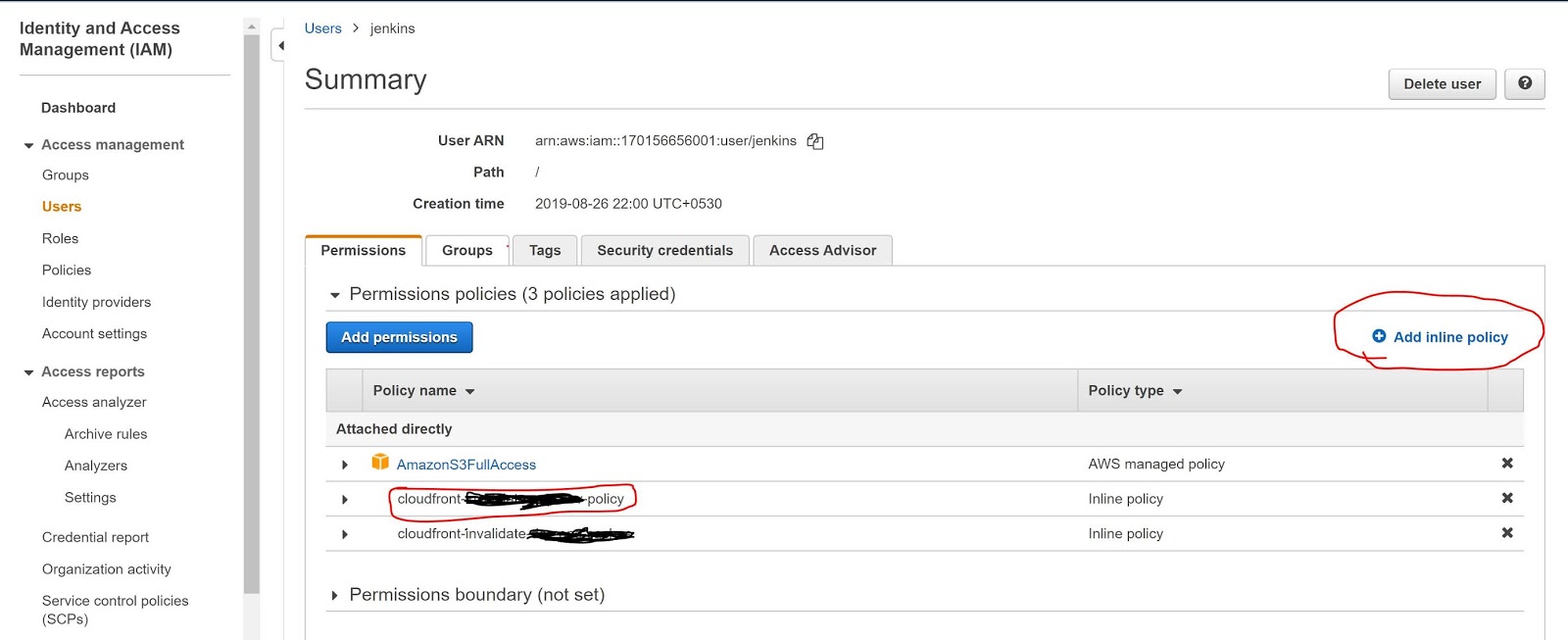
  • Now add the below policy into the JSON policy editor. Below the screenshot.

Policy JSON:-


{
    "Version": "2012-10-17",
    "Statement": [
        {
            "Sid": "VisualEditoro",
            "Effect": "Allow",
            "Action": "cloudfront:CreateInvalidation",
            "Resource": "arn:aws:cloudfront::17088938460999:distribution/UJH89JKKMOVY340"
        }
    ]
}


Sample Screenshot:-


Now, it's working fine. I can see the Jenkins logs below.

Jenkins Success Log:-

; perhaps you meant to use ‘PATH+EXTRA=/something/bin’?
+ aws configure set preview.cloudfront true
[Pipeline] sh
Warning: JENKINS-41339 probably bogus PATH=/var/lib/jenkins/tools/jenkins.plugins.nodejs.tools.NodeJSInstallation/node-v10.16.3-linux-x64/bin:/var/lib/jenkins/tools/hudson.model.JDK/JDK8-152/bin:$PATH:/usr/local/bin:$MAVEN_HOME/bin:/usr/local/bin:/var/lib/jenkins/tools/hudson.tasks.Maven_MavenInstallation/mvn/bin:/usr/sbin:/usr/bin:/sbin:/bin; perhaps you meant to use ‘PATH+EXTRA=/something/bin’?
+ aws cloudfront create-invalidation --distribution-id UJH89JKKMOVY340 --paths '/*'
{
    "Invalidation": {
        "Status": "InProgress", 
        "InvalidationBatch": {
            "Paths": {
                "Items": [
                    "/*"
                ], 
                "Quantity": 1
            }, 
            "CallerReference": "cli-1588239578-85708"
        }, 
        "Id": "I3HILN71CKWOV4", 
        "CreateTime": "2020-04-30T09:39:38.919Z"
    }, 
    "Location": "https://cloudfront.amazonaws.com/2019-03-26/distribution/UJH89JKKMOVY340/invalidation/I3HILN71CKWOV4"
}


27 April, 2020

How to get access key id and secret access key of amazon user.

This key combination (i.e. access key id and secret access key)  of aws will be useful everywhere when you need to access your aws services (Example - S3, EC2, etc). Its very simple to get the credentials for your user.


  • Goto to Identity and Access Management (IAM)
  • Click on Users (Left side of the page under Access Management)
  • Then click on your user name from the user list. You will be seeing the below screen.


  • Click on "Security and credentials" and click on "Create access key" to creating the new access key and download the .csv file as per the below screenshot.


  • Now you can see your access key and secret access key looks like as below.
    • Access key ID - AAKIASPHRAQWAKKLAR87
      Secret access key - sZ+7JJKd++UjfjfuueFJV9pXXVDOv48xiBbm


13 July, 2019

Find all palindrome strings in a java array.


In this article, we will see how to find all palindrome strings from an array. This is a very frequently asked questions in interview.  Also there is a question to find all palindrome number from an array.  Find few more collection interview question.  


PalindromeStrings.java


package com.javadevelopersguide.lab.basic;
/**
 * This program illustrates find all palindrome strings from array.
 *
 * @author manoj.bardhan
 *
 */
public class PalindromeStrings {
public static void main(String[] args) {
String stringArray[] = { "eye", "jdg", "javadevelopersguide", "aabaa", "hello", "pip" };
for (int i = 0; i < stringArray.length; i++) {
printOnlyPalindrom(stringArray[i]);
}
}
private static void printOnlyPalindrom(String str) {
String oldString = str;
StringBuilder builder = new StringBuilder(str);
if (builder.reverse().toString().equals(oldString)) {
System.out.println(oldString + " is a Palindrome.");
}
}
}


Output -

Find all possible palindromes in an array

In this article, we will see how to find all palindrome from an array. This is a very basic questions in interview, the interviewer will ask the same questions in different way. So, its good to know all possible questions from palindrome. Also there is a question to find all palindrome number from a list.  Find few more collection interview question.  Today we will see how to check a number is palindrome or not. 


FindAllPalindrome.java

package com.javadevelopersguide.lab.basic;
/**
 * This program illustrates find all palindrome from array.
 *
 * @author manoj.bardhan
 *
 */
public class FindAllPalindrome {
public static void main(String[] args) {
int numberArray[] = { 120, 990, 121, 777, 808, 1280 };
for (int i = 0; i < numberArray.length; i++) {
printOnlyPalindrom(numberArray[i]);
}
}
private static void printOnlyPalindrom(int number) {
int finalNumber = 0;
int oldNumber = number;
// Repeat the loop until the number became zero.
while (number != 0) {
// Get the First Digit (i.e. 1)
int firstDigit = number % 10;
// Get the Result number.
finalNumber = (finalNumber * 10) + firstDigit;
// Now get the remaining digits , after finding the first digit
number = number / 10;
}
// Now compare the finalNumber and oldNumber both are same or not.
if (finalNumber == oldNumber)
System.out.println(finalNumber + " is a Palindrome.");
}
}

Output -

121 is a Palindrome.
777 is a Palindrome.
808 is a Palindrome.


Find the number is palindrome or not


In this article, we will see how to check if a number is palindrome or not. This is a very basic questions in interview. But, you never know about what kind of question the interviewer will ask. So, better you prepare for every certain questions. Also there is a question to find all palindrome number from a list.  Find few more collection interview question.  Today we will see how to check a number is palindrome or not. 


Palindrom.java


package com.javadevelopersguide.lab.basic;
/**
 * This program illustrates how to check a number is palindrome or not.
 *
 * @author manoj.bardhan
 *
 */
public class Palindrom {
public static void main(String[] args) {
int number = 121;
int temp = number;
int finalNumber = 0;
// Repeat the loop until the number became zero.
while (number != 0) {
// Get the First Digit (i.e. 1)
int firstDigit = number % 10;
// Get the Result number.
finalNumber = (finalNumber * 10) + firstDigit;
// Now get the remaining digits , after finding the first digit
number = number / 10;
}
// Now compare the finalNumber and number both are same or not.
if (finalNumber == temp) {
System.out.println("This number is a Palindrome.");
} else {
System.out.println("This number is not a Palindrome.");
}
}
}


Output -

This number is a Palindrome.

11 July, 2019

Find the duplicate strings in a list

In this article, we will see how to find the duplicate strings and their counts from an array or list using java.  This is one of important programming questions in technical interview. In this program we have used Map and List both, so its a kind of collections interview questions. You can find few more collection interview question.  Today we will see Find the duplicate strings in a list. 


The logic is very simple here, see the below.

  • At first we need we need to create a Map to hold the key-value pair. Where key is the array element and value is the counter for number of time the array element repeats.
  • Then we will iterate the array and put into the map as per the above step. If the map contains the element earlier, then we will update the value +1.
  • Finally we will have the map , which holds the array elements with the counter for repentance. 
  • Now, we will iterate the Map , by checking the condition where the counter is more than 1 (i.e. its duplicated or repeated).

CountDuplicate.java

package com.javadevelopersguide.lab.basic;
import java.util.ArrayList;
import java.util.Arrays;
import java.util.HashMap;
import java.util.Map;
import java.util.Map.Entry;
/**
 * This program illustrate how to find the number of duplicate Strings in a
 * List. Also, we can find the number of repeat for each duplicate String.
 *
 * @author manoj.bardhan
 *
 */
public class CountDuplicate {
public static void main(String[] args) {
ArrayList<String> list = new ArrayList<String>(
Arrays.asList("JDG", "AA", "AA", "JAVA", "JavaScript", "Java", "Stream", "hibernate", "Hibernate"));
System.out.println("Input List = " + list);
Map<String, Integer> map = new HashMap<String, Integer>();
for (int i = 0; i < list.size(); i++) {
if (map.isEmpty()) {
map.put(list.get(i).toUpperCase(), 1);
} else if (map.containsKey(list.get(i).toUpperCase())) {
map.put(list.get(i).toUpperCase(), map.get(list.get(i).toUpperCase()) + 1);
} else {
map.put(list.get(i).toUpperCase(), 1);
}
}
int counter = 0;
for (Entry<String, Integer> entry : map.entrySet()) {
if (entry.getValue() > 1) {
counter++;
System.out.println("String Found " + entry.getKey() + " with count " + entry.getValue());
}
}
System.out.println("Total Duplicate String - " + counter);
}
}

Output -

Input List = [JDG, AA, AA, JAVA, JavaScript, Java, Stream, hibernate, Hibernate]
String Found AA with count 2
String Found JAVA with count 2
String Found HIBERNATE with count 2
Total Duplicate String - 3

How to find duplicate elements from array in Java

In this article, we will see how to find the duplicate values from an array or list using java.  This is one of important programming questions in technical interview. Each interviewer has different approach to access the candidate. But, the logic and the approach by candidate is really matter. In this program we have used Map and List both, so its a kind of collections interview questions. You can find few more collection interview question.  Today we will see how to find the duplicate values from array. 


The logic is very simple here, see the below.

  • At first we need we need to create a Map to hold the key-value pair. Where key is the array element and value is the counter for number of time the array element repeats.
  • Then we will iterate the array and put into the map as per the above step. If the map contains the element earlier, then we will update the value +1.
  • Finally we will have the map , which holds the array elements with the counter for repentance. 
  • Now, we will iterate the Map , by checking the condition where the counter is more than 1 (i.e. its duplicated or repeated).


DuplicateFinder.java


package com.javadevelopersguide.lab.basic;
import java.util.ArrayList;
import java.util.Arrays;
import java.util.HashMap;
import java.util.Map;
import java.util.Map.Entry;
/**
 * This program illustrate to find the duplicate values in a List.
 *
 * @author manoj.bardhan
 *
 */
public class DuplicateFinder {
public static void main(String[] args) {
ArrayList<Integer> list = new ArrayList<Integer>(Arrays.asList(4, 3, 5, 25, 25, 25, 13, 5, 22, 4, 90));
System.out.println("List Date = " + list);
Map<Integer, Integer> map = new HashMap<Integer, Integer>();
for (int i = 0; i < list.size(); i++) {
if (map.isEmpty()) {
map.put(list.get(i), 1);
} else if (map.containsKey(list.get(i))) {
map.put(list.get(i), map.get(list.get(i)) + 1);
} else {
map.put(list.get(i), 1);
}
}
System.out.println("\nDuplicate values are: ");
// Iterate the Map and display the duplicate values.
for (Entry<Integer, Integer> entry : map.entrySet()) {
if (entry.getValue() > 1) {
System.out.println(entry.getKey());
// TODO We can now put these values into any list.
}
}
}
}

Output - 

Find the largest number from an array using java

In this article, we will see how to find the largest number from an array using java.  This is one of basic questions in technical interviews. Earlier post we had seen how to find the smallest element from array. Now we will see how to find the largest number from integer array using java. 


The logic is very simple here, see the below.

  • At first we need to assume any element as largest value. Example - 0th location.
  • Then iterate over the array and compare with each element , whether its larger than the assumed larger value or not. If array element is larger then assign the array element value to assumed variable. Repeat the entire until end. 


FindLarestNumerInArray.java


package com.javadevelopersguide.lab.basic;
/**
 * This program illustrate how to find the Largest number from an array.
 *
 * @author manoj.bardhan
 *
 */
public class FindLarestNumerInArray {
// Find the largest value from an array.
public static void main(String[] args) {
int[] arr = { 200, 3, 4, 24, 33, 24, 22, 55, 90, 103, 150 };
// Assume the largest value is 0th Index
int largest = arr[0];
for (int i = 0; i < arr.length - 1; i++) {
if (arr[i] >= largest) {
largest = arr[i];
}
}
System.out.println("Largest Number is ::" + largest);
}
}


Output - 

Largest Number is ::200


Using Java 8

int largest = IntStream.of(arr).boxed().max(Comparator.naturalOrder()).get().intValue() ;


 Happy Learning.

Find smallest number in array java


In this article, we will see how to find the smallest number from an array using java.  This is one of basic questions in technical interviews. Earlier post we had seen how to use stream for finding the missing number. Now we will see how to find the smallest number from integer array using java. 


The logic is very simple here, see the below.

  • At first we need to assume the first smallest element.
  • Then iterate over the array and compare with each element , whether its smaller than the assumed value or not. If array element is smaller then assign the array element value to assumed variable. Repeat the entire until end. 

FindSmallestNumberInArray.java

package com.javadevelopersguide.lab.basic;
/**
 * This program illustrate how to find the smallest number from an array.
 *
 * @author manoj.bardhan
 *
 */
public class FindSmallestNumberInArray {
// Find the smallest value from an array.
public static void main(String[] args) {
int[] arr = { 200, 3, 4, 24, 33, 24, 22, 55, 90, 103, 150 };
// Assigning 0th index as first smallest number to proceed the program.
int smallest = arr[0];
for (int i = 0; i < arr.length - 1; i++) {
if (arr[i] <= smallest) {
smallest = arr[i];
}
}
System.out.println("Smallest Element is - " + smallest);
}
}

Output - 

Smallest Element is - 3 

Using Java 8

IntStream.of(arr).boxed().min(Comparator.naturalOrder()).get().intValue();


10 July, 2019

Find the Missing Number in a list


In this article, we will see how to find the missing number from a list using java.  This is one of important common interview question asked in interview. You can see, how to find all missing numbers from a list. In this program we will use core java or the traditional way using for loop for finding the miss number from a list. Earlier post we had seen how to use stream for finding the missing number. Now we will see how to find one missing number using traditional core java style. 


The logic is very simple here, see the below.

  • At first we need to find the MAX number from the list. We need this MAX number because , we need to calculate the SUM of all natural number up to that max number. 
  • Then , we need to calculate the sum of all those natural number.
  • Then we will subtract each element from the given list from sumOfNaturalNumbers.
  • Now, the at the last  the value inside sumOfNaturalNumbers is the missing number.


FindOneMissingNumber.java


package com.javadevelopersguide.lab.basic;
import java.util.ArrayList;
import java.util.Arrays;
/**
 * This program finds the missing number from a list. This is only for one
 * missing number using core java before jdk 8.
 *
 * @author manoj.bardhan
 *
 */
public class FindOneMissingNumber {
public static void main(String[] args) {
ArrayList<Integer> numberList = new ArrayList<Integer>(
Arrays.asList(10, 3, 2, 4, 5, 6, 7, 9, 8, 14, 1, 11, 13));
int sumOfNaturalNumbers = getSumUptoMax(findMax(numberList));
for (int i = 0; i < numberList.size(); i++) {
/*
* Substract each elements from list from sumOfNaturalNumbers and
* the final value will be the missing.
*/
sumOfNaturalNumbers = sumOfNaturalNumbers - numberList.get(i);
}
int missingNumber = sumOfNaturalNumbers;
System.out.println("Missing Number is :: " + missingNumber);
}
// Find the sum of all natural numbers up to limitNumber.
private static int getSumUptoMax(int limitNumber) {
int sum = 0;
for (int i = 1; i <= limitNumber; i++) {
sum = sum + i;
}
return sum;
}
// Find the greatest value from the list
private static int findMax(ArrayList<Integer> numberList) {
int largest = 0;
for (int i = 0; i < numberList.size() - 1; i++) {
if (numberList.get(i) >= largest) {
largest = numberList.get(i);
}
}
return largest;
}
}


Output -

Missing Number is :: 12